Posts

Methods to Check Who Visited Your Facebook profile

Image
Don’t worry; it is very simple method to check who visited your facebook profile. First of open your facebook timeline-for e.g. facebook.com/abcd. Click right side of mouse and select “View Page Source”. Make sure that your cursor is on left side of your profile picture. Now you will be on another page with lots of codes and data. You have to find there one specific word. So click Ctrl+F and you will see one text box appears in the top right side of that page. Type “InitialChatFriendsList” on that text box and hit enter. Now you will see the long list of the numbers after “InitialChatFriendsList”. Those numbers are the facebook profile ID’s of your friends. The first number is the facebook ID’s of your friends who just visited your facebook profile. Now copy the 15 digits number before “-”. Now go to another tab “facebook.com” and paste the 15 digits number after “www.facebook.com/(paste here 15 digits number)”. Now you will see the profile of your friend who recently visite...
Image
What is Li-Fi? The term Li-Fi was coined by pureLiFi’s CSO, Professor Harald Haas, and refers to light based communications technology that delivers a high-speed, bidirectional networked, mobile communications in a similar manner as Wi-Fi. Although Li-Fi can be used to off-load data from existing Wi-Fi networks, implementations may be used to provide capacity for the greater downlink demand such that existing wireless or wired network infrastructure may be used in a complementary fashion. LiFi is the use of the visible light portion of the electromagnetic spectrum to transmit information at very high speeds. This is in contrast to established forms of wireless communication such as Wi-Fi which use traditional radio frequency (RF) signals to transmit data. LTE-WiFi-LiFi-House-Illustration With LiFi, data is transmitted by modulating the intensity of the light, which is then received by a photo-sensitive detector, and the light signal is demodulated into electronic form. This...

Benefits on making website for a business

Image
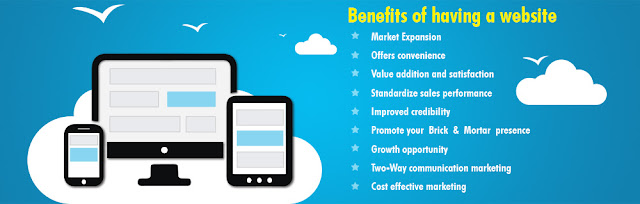
If you are a business who hasn’t quite broken into the online world, here are 10 reasons that will leave you wondering why you hadn’t done it sooner!   #1 Online Presence 24/7 Having a website means customers are always able to find you – everyday, 24/7. Meaning even at weekends and evenings your business is still accessible. It offers the customer convenience as they are able to access the information they need in the comfort of their own home, with no added pressure to buy. In general, it is much easier to click a few buttons online than to make the trip to a physical store to hunt someone down for information. It also prevents little annoyances such as waiting in queues.   #2 Credibility In this day and age it is much more credible for a business to have an online presence. People would likely be distrusting to any business that didn’t have a telephone number or a physical address, and that soon could ...

The Essential Step-by-Step Guide to Making Your Own Website

Get Your Domain Name The first thing you need to do before anything else is to get yourself a domain name. This is the name you want to give to your website. For example, the domain name of the website you're reading is "thesitewizard.com". To get a domain name, you have to pay an annual fee to a registrar for the right to use that name. Getting a name does not get you a website or anything like that. It's just a name. It's sort of like registering a business name in the brick-and-mortar world; having that business name does not mean that you also have the shop premises to go with it. Detailed information on getting a good domain name can be found in the article Tips on Choosing a Good Domain Name. After you read that, you will need to know the steps to registering a domain name and the things you need to look out for when registering. You can find a detailed guide in the article How to Register a Domain Name. It may also be wise to take a look at some of ...

Windows 10 tips and tricks

Image
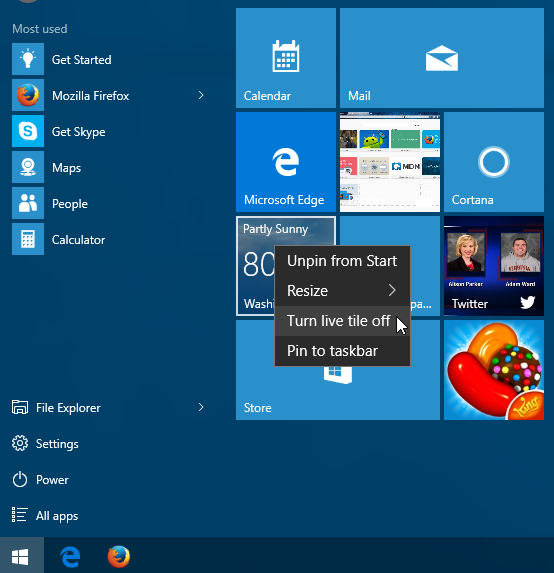
The latest version of Microsoft's main operating system is full of hidden shortcuts and behaviors. Millions of users have upgraded to Windows 10, and now the challenge is figuring out how to use it. Microsoft's flagship operating system combines elements of both Windows 7 and 8.1 but adds a few new places and interfaces as well. To check your network connections, for example, or to see a list of installed programs, the route may be unfamiliar. So if you're lost in Windows 10 right now, let us draw you a map. Windows 10's Start menu uses elements from both Windows 7 and Windows 8. The biggest change from Windows 7 is the pane of tiles on the right-hand side. If you don't like these, just right-click them and select Unpin From Start. You can also "Turn live tile off." The Twitter app, installed by default, will display a constantly updated feed that you can toggle off using "Turn live tile off." If you want to turn off an app that is not...

Introduction: Computer (Laptop) Cooling Basics

The cooling of the CPU (Central Processing Unit), otherwise referred to as "The Chip" or to laymen "The Brain" of the laptop is a dilemma that most manufacturers have to face when designing a laptop enclosure (casing) and choosing the correct CPU for it. The cooling is normally performed by a fan and some kind of metal conductor like copper or aluminum called a heat sink. The CPU, and lately the GPU (Graphics Processing Unit), are "connected" to the metal heat sink via a thermal grease or compound. This grease conducts heat but not electricity. The "trick" for manufacturers is to get rid of as much heat as possible using as small a fan and heat sink as the CPU will allow. Vents are also cut into the casing allowing the fan to suck cool air from the bottom, force it over the heat sink and blow it out the side or rear thus cooling the CPU and GPU. In more modern times copper is being used as the conducting metal, liquid is "pumped" throu...

How to fill EDV 2017, DV Lottery

How to fill EDV 2017, DV Lottery 2017 By admin |   DV lottery for 2017 is to be filled within 2016, EDV 2017 winners will leave country in 2017 they must fill their application and register it within 2016. Only after registering their application within 2016, randomly selected people will fly to the US. It has been a trend of filling a DV application online, participating in lottery and leaving the country for quality life in the US, this time it is DV 2017. People fill EDV lottery from espot, they charge you 500 for a photograph and which i consider is very high. I mean Rs.500 – Rs.1000 for just a photograph? No way, i am not paying that just of a photograph. US authorities coordinate the DV lottery have been requesting people not to pay for filing Electronic Diversity Visa (EDV) lottery. You can fill DV application from home with your simple internet connection. EDV lottery for 2017 will start accepting application in October 2015 till November 2016, this time you can fill...